

The Ultimate Guide to Using AI to Write a Novel

Hello, readers! I’ve got a useful “writing” guide for you today. I realize that I’ve dedicated this blog to writing tips on how to better one’s craft, so what’s more on theme with that mission than making a guide on how to use AI to accelerate your “writing” process! No, not editing. Writing. The writing itself. You read that right. Read on to figure out how you can craft a best seller without typing a single paragraph of prose and bothering with the whole pesky process of… actually thinking up original ideas and how to effectively communicate that to your readers.

In short, in today’s rapidly accelerating digital age, writers have unprecedented tools at their disposal. With the rise of artificial intelligence, crafting an entire manuscript has never been easier. Why rely on your own voice, perspective, or hard-earned life experience when a silicon parrot can spit back something resembling prose?

Step 1: Pick Your Genre

Choose a genre you love deeply. Something personal. Something meaningful. Then immediately ignore all of that and ask AI to brainstorm “10 hot book ideas in any genre that sells.” Even try “trending book themes” if you’re at a loss for what moral you should convey in this piece. Morality should be determined by mas market, which is what your AI companion will reflect.

Step 2: Prompt the AI… a Lot.

Type a prompt. Then rewrite it fourteen times because the AI keeps misunderstanding your “tone.”
(It’s almost like… writing? Except somehow worse.)

“Make it more whimsical.”
“But also somber.”
“But also funny, but not too funny.”
“And can it sound like me even though I haven’t written a word?”

Step 3: Marvel at How Fast the Words Appear

After all, this is the age of INSTANT gratification. Our writing process should evolve to follow suit. Books should be written in the time it takes to make instant oatmeal. That’s how you get a meaningful piece of work worth sharing with the world.

Step 4: Experience the Sudden Realization That This… Is Mediocre

Realize that this work is nothing but a Frankenstein of everything that has come before it. With extra emphasis on what’s been trending in writing in the last 5 years. As everyone knows, literature peaked when Romantasy Slop started being churned out and hitting shelves. These books are all so similar, you can’t quite remember if you’ve read them before or not, but that’s alright, the indulgent story beats are comforting if not entirely formulaic and overdone… right? We read for comfort. Comfort should always be a priority in literature at all times. At. All. Times. Do NOT present anything discomforting or something that could be perceived as causing your reader to THINK.

Wait, what we’re we talking about again.

Step 5: Denial or Rewrite

You’re at a crossroads at this step. You can continue to tell yourself it’s fine and send it off for publishing anyway, or you can attempt to salvage your AI slop by editing. A lot. Please, by all means, continue editing. Realize every sentence feels like it was handcrafted by someone who has never tasted food, felt sunlight, or endured a junior-high breakup. Rewrite one paragraph. Then two.

Suddenly, you’ve rewritten the entire chapter.

Suddenly, you’re rewriting the entire book.

Congratulations! You have now done the exact amount of work you were trying to avoid in the first place. You’ll tell yourself this is simply “refining your AI-assisted draft,” but really you’ve rewritten 90% of it because your actual human brain finally woke up and said, “No. This is wrong. It sounds wrong and it’s not good.”

Step 6: Face the Existential Crisis

Ask yourself why you thought skipping the workout would get you stronger.
Then look at AI and realize it’s not your writing partner. It can’t write for you in the same way it can go on a run for you, make a call to your mother for you, can’t eat healthy for you, can’t laugh for you, can’t love people for you, can’t, can’t, can’t.

The shortcut is so tempting, and AI companies will lead you to believe that the possibilities of AI are endless. Sure, there are uses to be explored, but AI is not endless, nor should it be. AI will never write a novel for you. AI will never be a human for you. It is in its name. It is against its very nature. You are human. Writing is in YOUR nature.

Author’s note:

This is not an ultimate condemnation of AI. More so a thought exercise to make sure we’re not using it irresponsibly. I’m quite curious how AI can function as an editing assistant or writing prompt generator. But the sudden flood of AI slop books on Amazon, where not a single word was penned by a being with a brain, has me clutching my pearls a bit. Feel free to leave your thoughts in the comments below, AI in writing has become a common topic on this blog as it invades the writing world, for better worse, and I’m always happy to hear others’ thoughts on these changes.

k byeeee! Thanks for reading!

AI for Writers: How to Use it Ethically

In a world teeming with AI-generated essays, AI-written novels, and even AI poetry (which, let’s be honest, reads like it was composed by a very earnest but deeply uninspired toaster), creatives everywhere are understandably wary. The existential crisis among writers is real.

I, too, have had my moments of wild optimism. AI seemed like such a useful tool! An endless supply of writing prompts? An easy way to get revision advice? Blog post title suggestions so I don’t have to stare at a blank screen in despair? Sign me up!

Oh, how naive I was.

I didn’t fully comprehend the sheer scope of AI misuse. AI-written books clogging up Amazon? Students submitting entire AI-generated essays as their own? As I watched the chaos unfold, I started to wonder: is there a way to use AI ethically as a writer? Or am I a hopeless fraud for even considering it?

After much reflection, I’ve come to this conclusion: AI and computers exist to do the boring stuff. The soul-sucking, time-wasting tasks that drain the joy from creativity. But the actual creating? That’s the part I want to hold onto. Because honestly, why would I want to shortcut the best part of writing? AI writing is often as bland as a bowl of plain oatmeal. No sugar. No nuts.

AI feels less like a foe or friend and more like a really boring intern/writing assistant in my humble opinion.

So, in the interest of making peace with AI (and ensuring it remains a helpful assistant rather than an artistic overlord), I’ve compiled a list of ways writers can use AI ethically and usefully without sacrificing their creative souls.

1. Character Development

Stuck on how your main character would react in a specific scenario? Describe them to AI and ask how they might logically respond. Or, better yet, throw them into a random situation and see what AI suggests and then tweak it until it actually feels like your character. Develop it. Run with it. Think of it as a digital version of those acting exercises where you “become” your character so to speak.

2. Synonyms: Because “Thingamajig” is too vague I guess

We’ve all been there: that word is right there on the tip of your tongue, but your brain has checked out for the day. AI can help you find the perfect synonym without forcing you into a three-hour thesaurus rabbit hole (which somehow always ends with you reading about the etymology of “spork”).

3. World-Building Without the Headache

Need to develop a magic system? A fictional government? A convincing but totally made-up economy? AI won’t write it for you, but it will ask you logical, specific questions that help flesh out your world. Think of it as a world-building coach, but not a ghostwriter.

4. Writing Exercises: When Your Muse is on Vacation

AI is great for generating writing prompts and exercises when you need a little jumpstart. You can take what it gives you and twist it into something uniquely yours. Don’t use it to write the whole thing. Use it to springboard you into your own little writing project.

5. Helping You Tackle That One Problem Paragraph

Ever stare at a paragraph, knowing it’s bad but not quite sure why? AI can help you pinpoint what’s off. Whether it’s tense shifts, awkward phrasing, overuse of adverbs (my personal Achille’s heel). It’s something akin to a second pair of eyes giving your work a quick glance, minus the existential dread of asking another human for feedback. (Though, personally, a real human is needed to fully help you realize the full potential of your work but maybe I’m just stuck in the stone age.)

6. Titling: The Worst Part of Writing (Fight Me)

I am a “working title” kind of person. If left to my own devices, all my drafts would be titled “Ugh, I’ll Fix This Later.” AI helps me generate blog post and chapter title ideas so I can get back to the fun part—actually writing the thing.

Final Thoughts

AI isn’t evil, but it also isn’t a replacement for creativity. It’s a tool. It’s a tool that, when used wisely, can make writing easier without making it soulless. Let’s not let it take over. After all, writing is about creating, not just generating words.

A Review of Logseq: Is it a Valid Obsidian Alternative?

So, I heard all the hype about Obsidian. Yaknow, the digital brain-builder everyone’s (or at least my side of the internet) raving about. Naturally, I was intrigued by the idea of weaving a web of my thoughts into an interconnected masterpiece. But then I saw the price tag. I wasn’t exactly thrilled to part with my money just yet.

So after a little googling I came up with Log Seq. It’s the free alternative that claims to do the same thing. By the same thing I mean build a network of your thoughts like some sort of mind-map wizardry. So, I took it for a spin for a week, all in the name of saving a buck (or several). Here’s how it went.

The Good Stuff

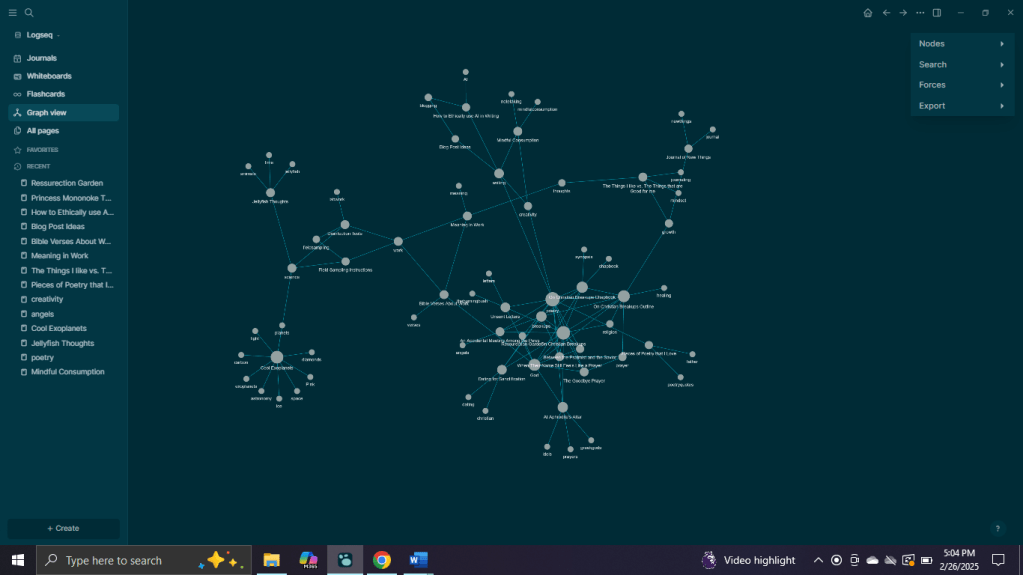
First off, Log Seq is phenomenal. Like, truly fascinating. The ability to link thoughts, ideas, and random musings into this complex web of information is seriously cool. I started from scratch, and by the end of the week, I had an impressive digital mind-map that was organized based off of tags. My main tags were #poetry, #science, #writing, #religion.

The Not-So-Good Stuff

There is only one thing that I really think hurts the log seq experience. Log Seq has no app. And while typing on my laptop is fine when I’m already sitting at it, capturing thoughts throughout the day? Not so much. I don’t know about you, but I have a knack for coming up with my best ideas at the most inconvenient times. Like, standing in line for coffee or pretending to listen during a meeting. Without an app to sync my thoughts, I was left trying to remember everything until I got back to my laptop… which is like trying to carry water in a colander. To well that’s reaaaally far away. An unneccessary metaphor I know. It’s just a funny mental image.

The Verdict

So, would I recommend Log Seq? Definitely. Especially if you’ve got the discipline to sit down and dump your brain at the end of the day. If not, you might be out of luck until they roll out an app. But overall, it’s an incredible tool with a ton of potential. I might just keep using it (at least until my wallet decides Obsidian is worth it).

Oh, and as promised, here’s my brain-web after a week of using Log Seq.

So, what do you think? Have you tried Log Seq or Obsidian? Do you have any other alternatives I should check out? Drop a comment below!

okay byeeee

Why You Need a “Second Brain” (And the Best Apps to Build One)

Look, my brain is a chaotic place. If I had to describe it, I’d say it’s like an overstuffed filing cabinet, but maybe one that got shook up in a move? Thoughts, ideas, grocery lists, and random existential crises. It’s all jumbled together, friends. I tried keeping track of everything in a planner, in my Notes app, and sometimes in an actual, physical notebook. Unsurprisingly, is still felt as if I was forgetting too much. Mostly writing ideas, maybe a grocery list item here and an appointment there.

That’s when I started doing some digging into the concept of a “second brain.” It’s basically a note-taking system where you offload all your thoughts, ideas, tasks (basically everything) into one organized digital space. The idea is to free up your actual brain for, you know, thinking, rather than frantically trying to remember where you wrote down that brilliant idea at 3 a.m.

I’ve only been looking into this for about a week and a half but here’s what I’ve found as far as notetaking/second brain apps go. I’ll give you a quick summary of each based off of my research and some quick clicking around and experimentation plus my personal opinion of each. Though, I WILL mention that I think each has it’s own strengths and may tailor itself to a different type of brain than mine. So, as cliche as it is, I’ll say to each their own.

Logseq: The Powerhouse for Outliners

If you’re a fan of bullet points, outlines, and linking your thoughts like a digital spider web, Logseq is your new best friend. It’s a free (this is the word that convinced me), open-source app that lets you create daily notes, build outlines, and interlink ideas like crazy. I love it because it’s local-first (meaning my notes are stored on my device, not in the cloud), and it uses plain text files, so I never have to worry about losing my data. Plus, the bi-directional linking lets me see how my thoughts connect over time—perfect for writing projects and organizing ideas. It is a little bare bones I will say and in using it, I definitely wish they had an app so I could sync all my ideas that I take on my phone to my software on my computer. Oh well, can’t have everything.

Why I Love It:

  • Local storage and privacy.
  • Bi-directional linking (think digital mind maps).
  • Outlining is its superpower.
  • It’s free!

Who It’s For:
People who love structure, outlines, and organizing their thoughts in a non-linear way. Writers, researchers, and obsessive list-makers. And for those of us who don’t want to spend money but want something like Obsidian minus the subscription. Which, speaking of which…

Obsidian: The Mind Mapper

Obsidian is the cool kid on the block that everyone’s talking about. It’s all about connecting your ideas with backlinks and visualizing them as a network of thoughts. If you’ve ever wanted to see how your ideas relate to each other like a digital conspiracy board (red strings and all), this is your app (MUCH like Log Seq, like I said).

Why It’s Popular:

  • Graph view to visualize your notes and their connections.
  • Customizable with a ton of community-made plugins.
  • Markdown-based (plain text files for the win).
  • Has an app with across device syncing.

Who It’s For:
Visual thinkers who like seeing the bigger picture. Great for creative projects, research, and anyone who likes to link ideas together. But, as mentioned before, you have to subscribe for this service. If you’re okay with dropping some cash, this one definitely looks the cleanest of all the network based notetaking apps.

Evernote: The Veteran with All the Bells and Whistles

Ah, Evernote. It’s been around forever, and for good reason. It’s toolbox is incredibly diverse. You can save text notes, voice memos, images, web clippings, and even PDFs. It syncs across all devices, so you can access your notes anywhere. But there’s a catch: the free version is pretty limited, and the premium version isn’t cheap (sorry to keep mentioning money but if you’re something like me, you might not have money to burn).

What It’s Good At:

  • Capturing everything—text, voice, images, web clippings.
  • Powerful search features, including text within images.
  • Easy syncing across multiple devices.

Who It’s For:
People who need an all-in-one digital filing cabinet. If you’re constantly gathering information from different sources and want it all in one place, Evernote is your go-to. Just be okay with spending money.

Notion: The All-in-One Workspace

With Notion you can take notes, manage tasks, build databases, and even design a personal wiki. It’s visually appealing and highly customizable, but it can be overwhelming at first because of how much it can do. I tried it for a while, but it felt like using a sledgehammer to crack a nut (just a bit overkill). That said, some people absolutely swear by it for its flexibility and diversity.

What Makes It Stand Out:

  • Highly customizable pages and templates.
  • Collaborative features for team projects.
  • Can be used as a note-taking app, project manager, and even a personal wiki.

Who It’s For:
Power users who want everything in one place. Probably really awesome for someone who does a lot of computer work for their job. If you like customizing workflows and want your notes, tasks, and databases all in one app, Notion is your playground.


Which One’s Right for You?

Choosing a second brain is, as most things are, up to your own personal taste and what type of record keeping jives with your brain. If you love outlining and linking ideas, give Logseq or Obsidian a try. Want a digital Swiss Army knife? Notion’s your best bet. Need a reliable all-in-one solution with easy syncing? Go for Evernote. And if you want something simple, there is definitely no shame in using your phone notes.

Personally, Logseq has caught my eye and I will probably make a whole other post based off of my experience with it. But, if any of the other apps or programs have caught your fancy, why not give ’em a go?

Maybe it’s time to give your brain a break and get yourself a second one. Just a thought. Or maybe mine’s the only one that needs a breather. Either way, thanks for reading!

The Day Microsoft Word and I Broke Up (and How LibreOffice Became My Rebound)

Picture this: A snow day. A rare, magical off day gifted by the powers of winter. Naturally, I did what any introverted poet would do—I decided to spend my day cozied up, writing for my dearest poetry book draft. Dreams of metaphorical brilliance danced through my head as I opened my laptop and double-clicked on my Word document.

And then—BAM. A digital slap to the face.

I couldn’t access my own document. Why? Because my Microsoft Office license, previously covered by my college, had expired. Since I’m no longer a student (shoutout to adulthood and its many expenses), this wasn’t a complete shocker. But the nerve. I was at least a little offended.

Out of curiosity, I decided to see how much it would cost to renew. I figured it couldn’t be that bad. I mean, it’s just a word processor, right?

Y’all. Ten bucks a month. A hundred dollars a year.

FOR WORDS.

Now, I’d like to think I’m a reasonable person, but this was some highway robbery. And the kicker? I couldn’t even open my original document unless I coughed up the cash. Sure, I could access it through the online version of Word, but that interface looked like it had a midlife crisis. Crowded, clunky, and as intuitive as a brick wall. And syncing it? Ha. Not happening.

That’s when I hit my limit. I had a poetry book to write, snow day vibes to enjoy, and I wasn’t about to let corporate greed ruin my creative flow. Determined, I opened a new tab and searched for alternatives. That’s when I met my new best friend: LibreOffice.

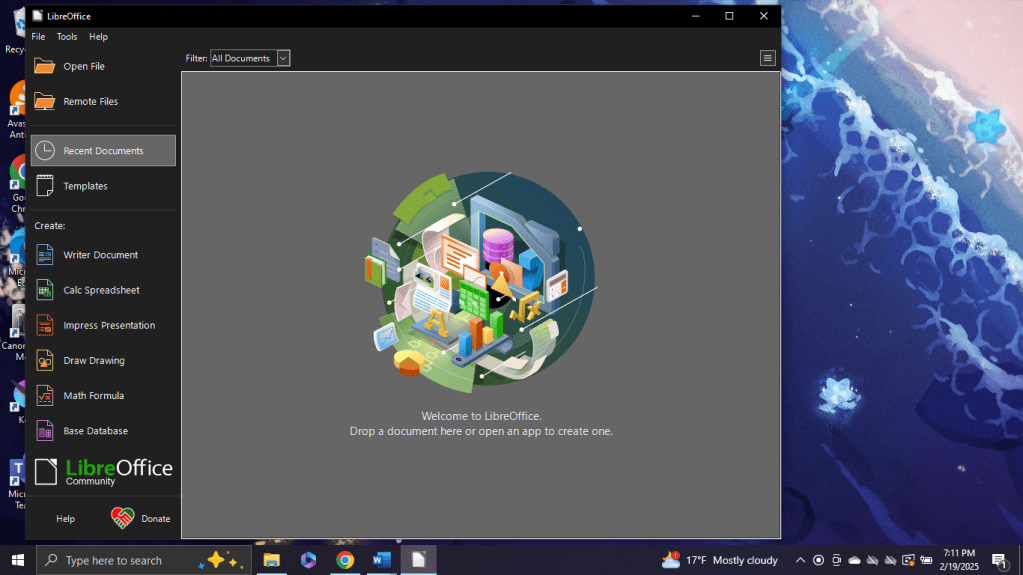
Let me tell you, LibreOffice is basically Microsoft Office but without the corporate handcuffs. It’s free, offline, and lets me open my own documents without asking for my credit card information. Revolutionary, right?

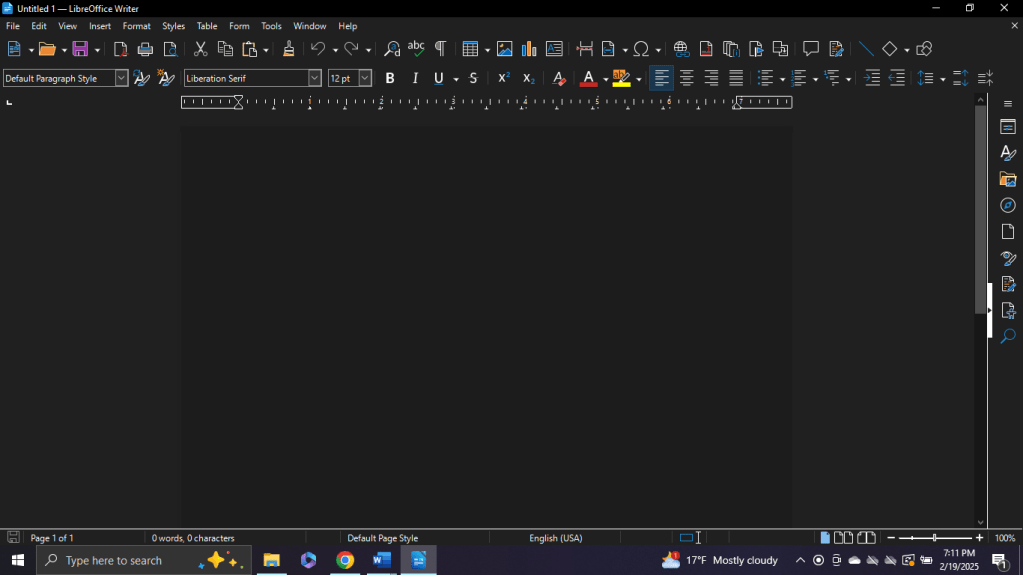
The best part? It felt just like old-school Word. Simple. Functional. No frills, no nonsense. And, most importantly, no monthly payments draining my bank account. I could write my poetry in peace, snow softly falling outside, without feeling like I had to sell a kidney just to access my own words.

So, here we are. Microsoft Word and I? We’re done. I’ve moved on. LibreOffice and I are getting along great, thank you very much. And the moral of the story? If a company tries to hold your words hostage for a hundred bucks a year, maybe it’s time to break up and find someone (or something) better.

LibreOffice, you’re the real MVP. And Microsoft? Yeah, we’re never, ever getting back together.

A Review of Lex AI Writer

I have historically have had a really forgiving view of AI. I think it’s here to stay and that much is true, but as time has gone on, I have gravitated to a more critical view of AI content, specifically AI writing. I think it’s great for brainstorming when you’re on square 1 or perhaps outlining a blogpost (here is where I reveal that it is not uncommon for me to ask chatgpt for help with organizing blog posts, titling, and other such small tasks that allow me to focus on my blog post’s actual content). Heck, I think it’s maybe even good for writing filler text that allows you to move your story forward until you can return and fill it with something better and far more creative. But over the past year, I’ve really seen the quality of writing content being replaced with quantity and this is no doubt due to the rise of AI.

AI garbage books flood KDP and many so-called-writers are making tutorials on how you can shortcut the process of creating a story and avoid *gasp* writing! I think someday I’ll make a post on this in the future about how these pretend writers must not really enjoy the craft if they’re continuing to engineer ways to NOT write but now is not that time. Today, I’m here to talk about a specific AI writing platform known as LEX.

Lex AI Writing Platform: A Powerful Tool with a Hidden Catch

Lex is one of the most intriguing AI writing tools I’ve explored. With a wide array of functions, it offers a startlingly diverse set of tools. I could see Lex catering to writers across various disciplines due to this diversity, whether you’re drafting blog posts, brainstorming story ideas, or simply fighting off writer’s block. However, as with any tool of this caliber, its strengths come with a critical caveat. But we’ll get there shortly. First, an introduction to Lex’s toolbox is in order.

A Brief Overview of Lex’s Tools

One of the few positives I will say is Lex impresses with its thoughtful organization and user-friendly interface. The platform boasts features designed to streamline the writing process. Maybe a little too streamlined, but again, I’m getting ahead of myself. The tools and functions are as follows:

  • Idea Generation: It helps writers overcome blank-page syndrome with prompts and suggestions.
  • Continuity Tools: Lex can pick up where you left off, offering full paragraphs based on the context you provide it.
  • Editing Suggestions: It attempts to analyze tone, grammar, and structure to help refine your writing.
  • Customization: You can tweak Lex’s settings to better fit your style or project goals. Probably the most impressive and useful tool in my opinion.

For writers seeking an all-in-one productivity aid, Lex delivers. It’s particularly helpful for outlining or fleshing out ideas quickly. I could see Lex being a useful tool in brainstorming or drafting stages when used wisely. However, we’re going to move on to my main concern with Lex and most Ai writing assistants as a whole.

RIP Individuality

While Lex offers remarkable utility, my primary concern lies in what tools like this mean for the art of writing itself being the erosion of individual style.

When used sparingly, Lex is a fantastic collaborator. Keyword being “sparingly”. How many people will use it sparingly? The temptation to rely on AI for large swaths of text is undeniable, but in doing so, we risk losing the unique voices that define good writing.

To illustrate this concern, I experimented with Lex by beginning a short story:

My opening line:
“Deep in the recesses of an experimental laboratory, rows of cages can be found.”

Lex’s continuation:
“Within these cages, a colony of felines reside. These are no ordinary cats, however. They are the subjects of a groundbreaking experiment, where scientists seek to unravel the mysteries of genetic manipulation. With each passing day, the cats undergo a series of tests and procedures, their DNA meticulously analyzed and altered. The researchers are driven by a singular goal: to create a new breed of cat, one that possesses enhanced abilities and traits beyond the scope of their natural counterparts.”

On the surface, this continuation isn’t bad—it’s clear, grammatically sound, and flows logically. However, it’s unmistakably AI-generated. The tendency to “tell rather than show” is glaring. Instead of inviting readers into the story through evocative imagery or nuance, Lex provides a clinical summary, flattening the narrative.

This paragraph reads more like a report than an actual story, and, while serviceable, it lacks the depth and personality of human storytelling. Such patterns, if adopted uncritically, could homogenize creative writing, sacrificing artistry for efficiency. I have yet to see any AI writer tackle this concern successfully. Everything a computer spits out tends to sound the same or very similar to each other: bland, uncreative, and report-y. AI tends to be trained on articles and educational resources after all so no surprise there.

Conclusion

Lex is a powerful tool that can be a game-changer for writers, offering diverse features and has a great organization and presentation of said tools. For brainstorming, outlining, and rough drafting, perhaps it’s worth a try. But the ability to write large sections of text quickly can also be its biggest drawback and churn up a lot of concern.

Overall, I think as we incorporate AI into the writing process, we must remain vigilant and oh-so-cautious. Writing is more than putting words on a page despite what school might have taught us. It’s about crafting a voice, an atmosphere, and an experience for readers. Tools like Lex should be wielded with care, enhancing human creativity rather than replacing it. For now, Lex is an impressive companion but ABSOLUTELY not a replacement for the writer’s pen.

Thanks for taking the time read and take care, friends!

Google Docs vs. Microsoft Word: Which is the better Word Processing Tool?

Ah, the question that plagues the digital scribes of our time: Google Docs vs. Microsoft Word. Which is better? Which is the stronger writing tool? This really isn’t a question I’ve seen asked a whole lot if I’m being entirely honest, but I have noticed that people tend to be pretty strong on whether or not they prefer one over the other. And why might that be? What strengths do each have to offer? Which would best fit you and your writing style? These are questions I hope to answer as I dive into the pros and cons of each word processor.

Let’s start with the heavyweight champion of the word processing world: Microsoft Word. Ah yes, the familiar embrace of the blue-and-white interface, the comforting click of keys as you type, the reassuring presence of Clippy (may he rest in peace). Word has long been the go-to tool for writers, editors, and procrastinators alike, offering a robust suite of features for crafting everything from essays to epic novels.

With its extensive formatting options, powerful grammar checker, and seamless integration with other Microsoft Office applications, Word is like a well-worn pair of slippers – reliable, comfortable, and always there when you need it.

Need to create a table of contents? Word’s got you covered. Want to track changes or collaborate with colleagues? No problem. Need to add some pizzazz to your document with fancy fonts and snazzy graphics? Just a few clicks away. Any questions or entirely lost? I’ve been a big fan of Microsoft’s help feature where you type into the bar what you’re trying to do. It isn’t perfect as you need to be pretty specific with your wording to find a function, but it’s been more helpful for me than the instances where it isn’t. In fact, this feature is one of the big things I miss when I try to use google docs. I get confused and then go to type it into the help bar only to find that it isn’t there.

Then, emerging from the digital ether like a phoenix rising from the ashes, we have Google Docs. Sleek, streamlined, and oh-so-socially conscious, Docs is the new kid-er, or should I say software? on the block, disrupting the traditional word processing paradigm with its cloud-based collaboration features and minimalist design.

Unlike Word, which requires a hefty software installation and a subscription fee, Docs lives in the cloud, accessible from any device with an internet connection and a web browser. This makes it ideal for collaborative projects, allowing multiple users to edit a document simultaneously and see changes in real-time – no more emailing attachments back and forth or worrying about version control.

But while Google Docs may be the darling of the digital nomad set, it’s not without its drawbacks. The formatting options are somewhat limited compared to Word, and the grammar checker leaves much to be desired. Plus, if you’re a die-hard fan of Microsoft’s suite of Office applications, you may find Docs lacking in some areas. This is my very problem with it- it’s a little TOO minimalist. Everything I want done to my document (within reason of course) I want to be able to do on my singular word processor. I don’t want to have to search out other tools. Sure, if you want to keep it simple and have all your documents on one cloud, that’s great! Sounds like Google Docs is the application for you. For me personally however, it can leave much to be desired features wise.

Let’s not get too ahead of ourselves though before announcing Microsoft Word the supreme word processor. It’s got some glaring flaws too that I think are worth pointing out and going more in depth on. So, let’s take a moment to explore the underbelly of the behemoth that is Microsoft Word. Despite its undeniable dominance in the world of word processing, even this titan has its Achilles’ heel.

First, let’s talk about my main issue with Microsoft products in general- price. One of the most glaring drawbacks of Microsoft Word is its cost. While some users may have access to it through institutional licenses or subscription packages, others may find the standalone price prohibitive, especially for occasional users or those on a tight budget.

Next, let’s discuss Microsoft word’s complexity. While I bashed Google docs for being a bit too simplified, I think an argument could be made that Microsoft Word is too complicated and overloads you with too many options, especially if you’re not used to the plethora of menus. In short, while Word offers a plethora of features and functionalities, this can also be its downfall. The sheer breadth of options available can overwhelm novice users, leading to frustration and a steep learning curve. From formatting quirks to obscure settings buried in nested menus, navigating Word’s labyrinthine interface can sometimes feel tedious and frustrating.

Additionally, it is also worth noting that Word, as an application, is Resource Intensive.  Word is notorious for being a resource hog, consuming memory and CPU cycles like a hungry-hungry hippo. This can lead to sluggish performance on older or less powerful computers, especially when working with large documents or complex layouts.

Next, I want to discuss Word’s issue of Proprietary Formats. Word’s native file format (.docx) can be both a blessing and a curse. While it offers advanced features like document encryption and metadata preservation, it can also pose compatibility issues when sharing files with users of other word processing software. This lock-in to a proprietary format can be frustrating for users who value interoperability and open standards.

So, dear reader, which is the superior writing tool: Google Docs or Microsoft Word? As with all things in life (and I’m sure you saw this coming), the answer ultimately depends on your personal preferences and specific needs. If you value flexibility, collaboration, and ease of access, Docs may be the way to go. But if you crave versatility and a robust feature set, Word reigns supreme.

In the end, whether you’re pounding out a novel, drafting a memo, or composing a love letter to your significant other (hey, no judgment here), the most important thing is to find a writing tool that works for you – because when it comes to putting pen to digital paper, it’s not about the software, it’s about the story you’re telling. So, try not to get all caught up on picking a font or writing tool and just write. I know you’re probably procrastinating just as I am penning this blog post. I guess we’d both better get back to it?